AV that works when you walk in the room.
Conference rooms, council chambers, training spaces, and LED walls — designed, cabled, and commissioned by the same team that runs your network, so nothing gets lost between vendors.
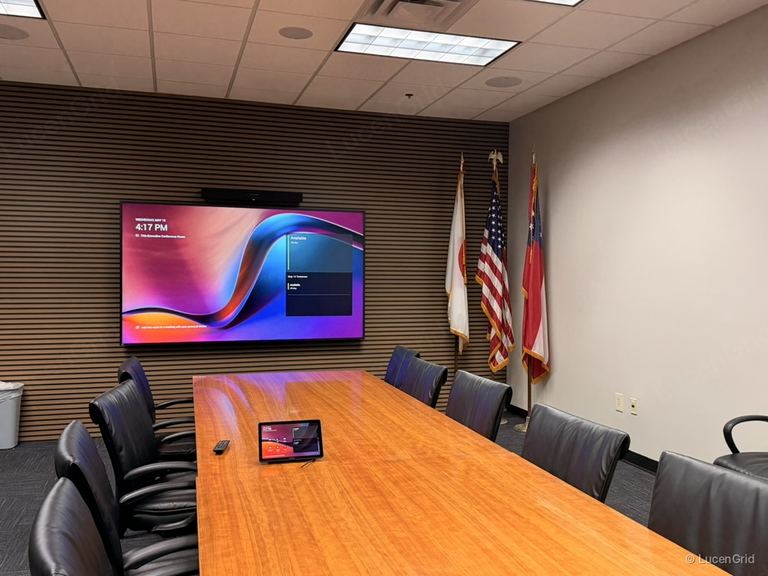
An executive conference room, done once.
A corporate client's executive conference room: one display, one soundbar with integrated camera and microphones, one touch panel on the table. Walk in, tap the meeting, and it starts.
- Room calendar on the displayThe screen shows today's bookings when the room is idle, so nobody walks in on someone else's meeting.
- Camera, mics and speakers in one barFraming follows the speaker; the far end hears the whole table. No ceiling tiles opened, no separate DSP to manage.
- One-touch controllerJoin, share, mute and end from the tablet. Staff don't need a manual, and there's nothing to re-pair.
- Cabled and commissioned by usStructured cabling, mount, power, network drop and the platform configuration were all one scope — and it's supported under the client's IT agreement.
Spaces we build
Microsoft Teams · Zoom · Webex · Google Meet — hardware-agnostic, standards-based. Every room is specified from how your people actually use it, not from a catalog.
Conference & board rooms
Displays, cameras, microphones, speakers, and control systems designed for one-touch video conferencing and presentations — from four-seat huddle rooms to twenty-seat boardrooms.
Council chambers & public meeting rooms
Dais and public microphones, recording and streaming, agenda displays, and controls that a clerk can run — built around public-records and open-meeting requirements.
Classroom & training rooms
Interactive displays, projection, and easy-to-use controls that support clear instruction and collaboration, with lecture capture when you need it.
Direct-view LED & video walls
Gymnasium displays, lobby walls, and command centers — engineered, mounted, and calibrated, with content and signage players managed alongside your network.
Distributed audio & paging
70V/100V distributed audio, paging, and sound systems for offices, plants and public buildings — designed, pulled, terminated, and tuned.
Digital signage & lobby displays
Welcome boards, wayfinding, production dashboards and KPI screens — the players, the content schedule and the displays, all supported by one team.
What a conference room build includes
A fixed-scope room, quoted after a site walk. Here's what's inside the number.
Site survey & design
Room dimensions, sightlines, acoustics, lighting, existing cabling and power. You get a drawing and an equipment list before anything is ordered.
Display or projection
Sized for the farthest seat, mounted on a proper backing, with concealed power and data. Dual displays for rooms that present and video-call at once.
Camera, microphones, speakers
All-in-one video bars for rooms up to about twelve seats; ceiling or table mics with a DSP for larger rooms and chambers.
Room system & controller
A certified room appliance for your platform, a touch controller on the table, and a scheduling panel at the door if the room is shared.
Cabling & network
Structured cabling pulled and terminated by our own techs, a dedicated switch port with the right VLAN and QoS, and the room's devices enrolled in monitoring.
Commissioning, training & support
Every room is tested end-to-end with a real call, your staff are walked through it, and the room is supported under your agreement — not handed off.
How an AV project runs
Most single-room projects go from site walk to first meeting in four to six weeks, equipment lead times permitting.
Site walk & scope
An engineer visits, measures the room, checks power, cabling and network, and asks how the room is actually used. You get a scoped quote — not a price list.
Design & order
Drawing, equipment list and a schedule you approve. We order, stage and pre-configure everything in our shop so install day is short.
Install, commission, train
Cabling, mounting, devices, platform configuration, a live test call with your team, and a short training session. Then the room goes under support.
Why an IT company for AV
Most AV integrators stop at the wall plate. Most IT providers won't touch the display. We do both, under one agreement.
| LucenGrid | Typical MSP | |
|---|---|---|
| Network | The room is put on your LAN by the people who manage your LAN — right VLAN, QoS, firewall rules, monitoring | 'Talk to your IT guy' — and the room never quite joins |
| Cabling | Our own structured-cabling techs pull and certify the runs | Subcontracted, or left to you |
| After install | Supported under your managed IT agreement, same helpdesk, same engineers | Separate support contract, separate number, separate blame |
| Platform updates | Room appliances patched and monitored with the rest of your fleet | Firmware drifts until something breaks |
| Public sector | Council chambers, records retention and procurement are everyday work | Corporate-only playbook |
Who we build for
Trusted by municipalities and local governments, manufacturers, and small businesses across the mid-Atlantic.
Municipal & local government
Council chambers, boardrooms, EOCs and training rooms — with the documentation and open-meeting awareness that public work needs.
Corporate offices
Boardrooms, huddle rooms and all-hands spaces standardised on one platform so every room works the same way.
Manufacturing & plants
Production dashboards on the floor, training rooms, paging and distributed audio in loud environments.
Education & nonprofits
Classrooms, multipurpose rooms and gym displays sized for real budgets, with simple controls for rotating staff.
Questions we hear most
Can you work with the equipment we already own?
Usually. We'll tell you on the site walk what's worth keeping, what needs replacing, and why — and quote both ways if it's close.
Do we have to pick Teams or Zoom first?
No. We'll design around the platform your organisation lives in, and most modern room systems can join the other platform's meetings as a guest.
Do you install the cabling or do we need an electrician?
We pull and terminate the low-voltage cabling ourselves. If a new power circuit is needed, we'll coordinate the electrician and tell you up front.
What happens when something stops working after install?
You call the same number as for IT. Rooms we install are supported under your managed agreement — monitored, patched and fixed by the same engineers.
Can you do council chamber recording and live streaming?
Yes. Dais and public mics, recording, streaming to the platforms your clerk already uses, and controls designed so a non-technical staff member can run a meeting.
Where do you install?
From offices in Raleigh NC, Roanoke VA and Wilmington DE we cover North Carolina, Virginia, West Virginia, Maryland, DC and Delaware with our own engineers.
Where we install
On-site from three regional offices, with our own cabling and AV technicians.
Offices in Raleigh, NC · Roanoke, VA · Wilmington, DE — addresses and directions.
Tell us about the room.
Send a photo and rough dimensions if you have them. An AV engineer will reply with next steps and a budget range before any site visit.
Prefer to talk? 484-823-9024 — you'll reach an engineer, not a call center.